Best hardware wallet 2026: Trezor, Ledger, Coldcard and more compared
Eleven wallets compared on firmware, secure chips, air-gapping and price, plus what the 2026 Coldcard seed bug changed and how to receive a wallet safely.
Key takeaways
- The largest hardware-wallet loss of 2026 came from weak seed generation on Coldcard firmware, not a hacked device, so how a seed is created matters as much as the chip.
- The Trezor Safe 5 is our pick for multi-coin beginners, and the Coldcard Q for Bitcoin-only holders who will add dice and a passphrase.
- For savings you cannot replace, a 2-of-3 multisig across three makers stops any single firmware bug from emptying the wallet.
- Never use a wallet that arrives with a recovery phrase, and test a full recovery before you fund it.
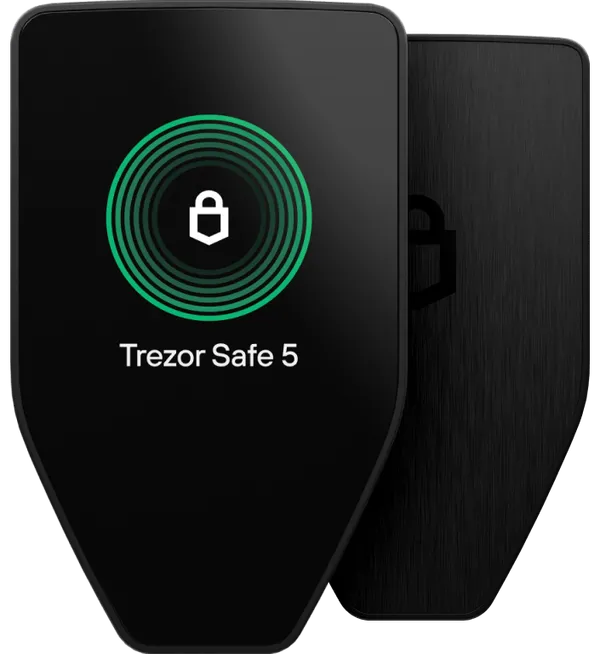
If you hold several coins and want the fewest ways to get it wrong, the Trezor Safe 5 is our default pick for 2026: open-source firmware, an EAL6+ secure element and a colour touchscreen for $169 at the time of writing. Bitcoin-only holders are better served by an air-gap capable signer such as the Coldcard Q or Jade Plus, set up with dice and a passphrase, and anything you could not afford to lose belongs in a multisig spread across two or three makers. The largest hardware-wallet loss of the year came from weak seed generation rather than a hacked device, so how you set a wallet up now matters as much as which one you buy.
What 2026 changed about choosing a wallet
On 30 July 2026 attackers started sweeping bitcoin out of wallets whose seeds had been created on Coldcard devices. Coinkite's advisory is clear: the devices were not hacked or remotely accessed. A firmware bug weakened seed generation, and attackers regenerated the private keys offline. Mk2 and Mk3 seeds made on firmware 4.0.1 to 4.1.9 (from March 2021) were hit hardest, at as little as 40 bits according to TRM Labs. Coinkite estimates Mk4, Mk5 and Q seeds created before the fix carry about 72 bits instead of the intended 128.
TRM Labs, citing Galaxy Research, put losses near 1,816 BTC (about $116 million) from more than 5,200 addresses; a later Galaxy figure reported by Cointelegraph was 1,778 BTC. Treat both as preliminary. The lessons apply to every brand:
- A firmware update fixes future seeds. It does not repair a seed that already exists.
- Your own entropy is insurance. Coinkite does not consider seeds that mixed in at least 50 private dice rolls at risk, and a strong BIP-39 passphrase added a separate barrier.
- Several independent randomness sources fail more gracefully than one. BitBox combines five, two of which (entropy from your computer and a hash of your device password) never come from the device itself.
- Keys from different makers in a multisig do not share a single point of failure.
One more disclosure is worth knowing. In June, Trezor confirmed that Ledger's Donjon lab had extracted a subset of secrets from the TROPIC01 chip in the Safe 7, using laser fault injection on a desoldered, decapsulated chip. Trezor says keys and backups are not stored on that chip and the PIN stays protected by the other two layers, though firmware cannot patch the flaw.
The 11 wallets compared
Prices are ours at the time of writing. Specs come from each maker's own product and documentation pages, checked in October 2026. We split the list by how each device talks to your phone or computer, because that is the first fork in the road.
USB and Bluetooth signers
| Wallet | Firmware | Security chips | Coins | Connections | Screen | Our price |
|---|---|---|---|---|---|---|
| Trezor Safe 7 | Open source | TROPIC01, EAL6+ chip, STM32U5 | Multi-coin; Bitcoin-only edition | USB-C, Bluetooth | 2.5in colour touch, 520 x 380 | $249 |
| Trezor Safe 5 | Open source | EAL6+ (Optiga Trust M) | Multi-coin; Bitcoin-only edition | USB-C | 1.54in colour touch, 240 x 240 | $169 |
| Ledger Nano Gen5 | Closed Ledger OS | ST33K1M5, CC EAL6+ | Multi-coin | USB-C, Bluetooth, NFC | 2.8in monochrome E Ink touch, 300 x 400 | $179 |
| Ledger Flex | Closed Ledger OS | ST33K1M5, CC EAL6+ | Multi-coin | USB-C, Bluetooth, NFC | 2.8in E Ink touch, 480 x 600 | $249 |
| Ledger Stax | Closed Ledger OS | ST33K1M5, CC EAL6+ | Multi-coin | USB-C, Bluetooth, NFC, Qi charging | 3.7in curved E Ink touch, 400 x 670 | $399 |
| BitBox02 Nova | Open source, reproducible builds | Optiga Trust M V3, EAL6+ | Multi or Bitcoin-only edition | USB-C, Bluetooth | 128 x 64 OLED, touch sensors | $185 |
Air-gap capable signers
| Wallet | Firmware | Security chips | Coins | Air-gap method | Screen and input | Our price |
|---|---|---|---|---|---|---|
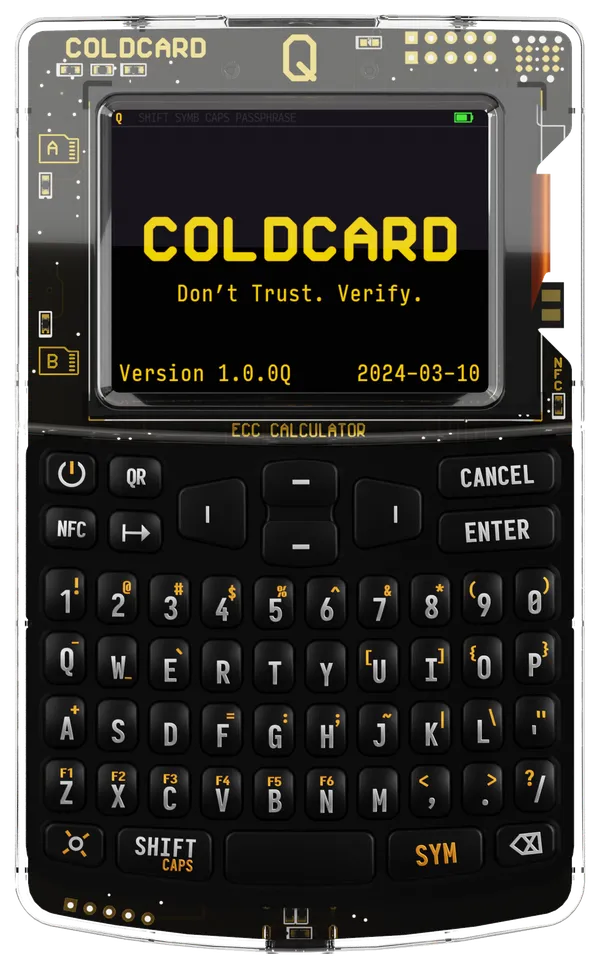
| Coldcard Q | Public source, Commons Clause licence | Two secure elements (ATECC608, DS28C36B) | Bitcoin only | QR scanner, two microSD; also NFC, USB-C | 320 x 240 colour LCD, QWERTY keyboard | $289 |
| Coldcard Mk5 | Same as Q | Same as Q | Bitcoin only | microSD; also NFC, USB-C | Gorilla Glass screen, numeric keypad | $189 |
| Foundation Passport Prime | Open source (KeyOS) | ATECC608C plus SAMA5D2 security processor | Bitcoin; ETH and SOL via optional Legacy Mode | Camera QR; also NFC, USB-C, Bluetooth | 3.5in IPS touchscreen | $349 |
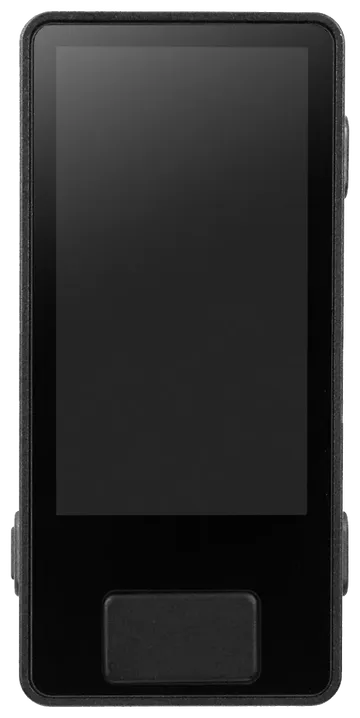
| Blockstream Jade Plus | Open source | None; blind-oracle "virtual secure element" | Bitcoin only | Camera QR, SD card; also USB-C, Bluetooth | 1.9in IPS, 320 x 170 | $149 |
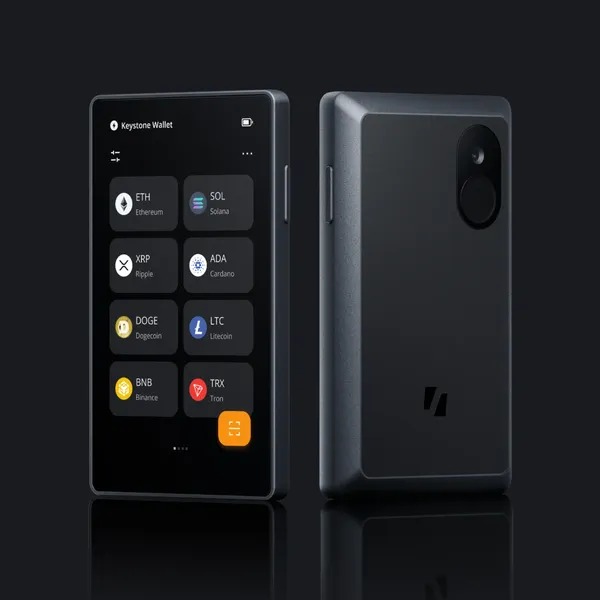
| Keystone 3 Pro | Open source | Three security chips | Multi-coin or Bitcoin-only firmware | Camera QR, microSD; no Bluetooth | 4in touchscreen, 480 x 800 | $149 |
All eleven support a BIP-39 passphrase, and multisig is mostly a software question: Sparrow, for example, supports multisig with "all common hardware wallets". What differs is how bearable a long passphrase is to type (the Coldcard Q's keyboard and the big touchscreens win) and how much the device checks a multisig setup itself. BitBox, Coldcard, Jade and Passport Prime document multisig handling, and Coldcard adds policy-enforced co-signing.
Open firmware, closed firmware and Ledger Recover
Every hardware wallet asks you to trust its maker's firmware. The question is whether outsiders can check it. Trezor, BitBox, Blockstream, Keystone and Foundation publish their firmware as open source, and BitBox publishes reproducible builds so anyone can confirm the binary matches the code. Coldcard's firmware has been public since 2018, with reproducible builds since 2021, but its licence adds the Commons Clause, so reviewers often call it source-available rather than open source. Ledger's secure-element operating system is closed; parts have been published since 2023, under Ledger's own licence.
That became concrete in May 2023, when Ledger announced Recover, an optional paid service that backs up your seed in encrypted fragments held by third parties. In a now-deleted post quoted by CoinDesk, Ledger's support account wrote that "technically speaking it is and always has been possible to write firmware that facilitates key extraction." A Ledger spokesperson told CoinDesk the company cannot and will not extract keys, and that any action involving them must be approved on the device. There is no public evidence Ledger has ever taken anyone's seed. The episode showed that the safeguards around an export path live in code outsiders cannot fully read.
Open code is no guarantee either: the Coldcard bug sat in publicly readable firmware from 2021 to 2026. Openness means someone can find a flaw, not that someone has. Our view: Ledger's hardware is well engineered, and Ledger Wallet supports 500-plus assets directly, with thousands more through third-party wallets. If you need that breadth, a Ledger is a reasonable choice; leave Recover off. If you would rather verify than trust, buy from the open side of the table.
Air-gapped signing versus USB and Bluetooth
An air-gapped wallet moves transactions by QR code or memory card, so it never opens a data connection to an internet-connected machine. That shrinks the attack surface, and any scanner can read the QR data if you want to check it. The cost is friction: more steps per transaction.
The labels need care. The Keystone 3 Pro has no Bluetooth or Wi-Fi at all. The Coldcard Q signs over QR or microSD, runs on three AAA batteries, and lets you permanently disable USB data and NFC by scratching off a circuit-board trace. The Jade Plus can run fully air-gapped with its camera and an SD card, but also has Bluetooth, which you can switch off. Passport Prime scans QR codes too, but by default pairs with its Envoy app over QuantumLink, encrypted Bluetooth on a separate chip. Foundation's FAQ says Bluetooth and NFC can be disabled, and that the default backup puts one of three Shamir shares in your phone's iCloud Keychain or Android backup; you can keep all three Keycards yourself instead.
Bluetooth is not automatically a weakness: the Safe 7 encrypts its link with an open-source protocol, and every device here makes you confirm on its own screen. It does add a radio to the attack surface. If you sign a few times a year, we see little reason to pay for that; if you sign weekly from a phone, it is a fair trade.
What a secure element does and does not do
A secure element is a tamper-resistant chip that guards secrets from someone holding your device: it limits PIN guesses and resists probing. Coldcard pairs two from different vendors. The Safe 7 stacks the auditable TROPIC01 on an EAL6+ chip and an STM32U5, so an attacker must beat more than one part. The BitBox02 Nova runs open firmware on its main processor and uses its secure chip to harden the device password. The Jade Plus deliberately has none: its "virtual secure element" relies on a blind oracle server that must cooperate before the PIN works, and you can run your own.
None of this protects a weak seed, a recovery phrase typed into a phishing site, or a malicious transaction you approve. The 2026 Coldcard losses happened on devices with two secure elements.
Our picks for four kinds of buyer
Bitcoin-only maximalist: Coldcard Q
The Coldcard Q ($289) is still the most capable Bitcoin-only signer we sell: a keyboard for long passphrases, a QR scanner, two microSD slots, duress and brick PINs, and spending-policy co-signing. Current standard firmware (5.6.3 for Mk4 and Mk5, 1.5.3Q for the Q, per Coinkite's security status page) requires 65 key presses with unpredictable timing, 50 dice rolls or 128 coin flips for every new seed, mixed with device entropy, and Coinkite publishes a script to verify the dice mix offline. Update before creating a seed, roll real dice, add a passphrase. If the incident cost Coinkite your trust, the Jade Plus or a Bitcoin-only BitBox02 Nova are open-source alternatives.
Multi-coin beginner: Trezor Safe 5
The Safe 5 ($169) gets the basics right: open-source firmware, an EAL6+ secure element, PIN and passphrase entry on the device, a 1.54-inch colour touchscreen and Trezor Suite on desktop. One catch: Trezor lists no swap, send, setup or device management on iOS for this model. If your main device is an iPhone, step up to the Trezor Safe 7 ($249), which adds Bluetooth, a 2.5-inch screen and the three-chip design. If you need a chain Trezor does not support, the Ledger Flex ($249) is the closed-firmware alternative; decline Recover.
Air-gapped and advanced: a three-maker multisig
For money you could not replace, any single device is a single point of failure. Our pick is a 2-of-3 Bitcoin multisig from three makers that all sign by QR: Coldcard Q ($289), Blockstream Jade Plus ($149) and Keystone 3 Pro ($149) on its Bitcoin-only firmware, coordinated in a wallet such as Sparrow. That is $587 of hardware, three separate codebases and three approaches to secure chips, so no single bug empties the wallet. Generate each seed on its own device, back each up separately, and keep the wallet descriptor with every backup, because recovery needs it. If you prefer one premium device, Foundation Passport Prime ($349) is open source and audited by Keylabs; switch off Bluetooth and the cloud-stored share to make it behave like a classic air-gapped signer.
Budget: Keystone 3 Pro or Jade Plus
At $149 each, the Keystone 3 Pro is the budget pick for multi-coin holders (air-gapped by default, 4-inch touchscreen, fingerprint sensor) and the Jade Plus is the budget pick for Bitcoin. One honest note: our minimum order is $399 in products, so a single $149 wallet will not check out on its own here. Two of them make a natural pair for a primary wallet and a backup signer, and the three-maker multisig above ($587) clears the minimum on its own.
How to receive a hardware wallet safely
Most hardware-wallet thefts are set up before the first transaction. Work through this the day the box arrives:
- Check the tamper evidence. Trezor's guide shows a holographic seal over the Safe 5's USB-C port that leaves a "VOID" residue when peeled; Coinkite tells Coldcard buyers to inspect the tamper-evident bag first. If a seal is torn, missing or re-stuck, stop and contact the manufacturer before powering on.
- Refuse any pre-filled seed. Backup cards must be blank; Trezor says not to use a device whose cards already have words on them. A wallet that arrives with a recovery phrase is a theft in progress.
- Generate the seed on the device. Never import words someone else gave you. Coldcard, Jade and BitBox all document dice-based seed creation; for a large balance, use it.
- Verify the firmware. Trezor devices leave the factory with no firmware installed, and a new one that already has firmware should not be used. Coinkite tells Coldcard owners to stop at the main menu, install the current release and verify the signed download before choosing a seed.
- Test a recovery before funding. Record the words and wallet fingerprint, reset the device, restore from your backup and confirm the fingerprint and first receive address match. Then send a small amount in and spend it back out.
- Move the backup to metal. Paper burns and soaks. Stamp or engrave the words, and store any passphrase in a different place from them.
- Never share the words. No manufacturer, support agent or store needs your recovery phrase or passphrase.
That covers us too. Our wallets ship factory-sealed, and we never see or ask for seed phrases; anyone claiming to be us who does is attempting theft. Where you buy also affects privacy: in August 2026 Trezor disclosed that a breach at one of its shipping providers exposed customers' names and addresses, and its advice included using an email not tied to your identity and paying in crypto. We offer guest checkout with optional email, take crypto only, and ship in an insured, unbranded box (see shipping).
What we'd buy
- First wallet, several coins: Trezor Safe 5 ($169), or the Safe 7 ($249) if you live on an iPhone.
- Bitcoin only, one device: Coldcard Q ($289) on current firmware, with 50 dice rolls and a passphrase.
- Savings you cannot replace: Coldcard Q, Jade Plus and Keystone 3 Pro as a 2-of-3 multisig ($587 together).
- Tight budget: Keystone 3 Pro or Jade Plus ($149 each), paired with a second signer.
- Whatever you choose: blank backup cards, seed made on the device, recovery tested, words on metal.
Every wallet above is in our self-custody collection. Prices were correct at the time of writing and can change.
Questions and answers
Is Coldcard safe to use after the 2026 seed bug?
Coinkite says current firmware (5.6.3 for Mk4 and Mk5, 1.5.3Q for the Q) fixes seed generation and now requires your own entropy for every new seed. Updating does not repair a seed created on affected firmware, so migrate any such seed unless it was made with at least 50 private dice rolls.
Do I need an air-gapped hardware wallet?
Not necessarily. A USB or Bluetooth wallet with its own screen already keeps keys away from malware on your computer. Air-gapping removes the data connection entirely, which matters most for large Bitcoin holdings that you sign only occasionally.
Is Ledger Recover mandatory?
No. Ledger Recover is an optional paid subscription, and Ledger says any action involving your keys must be approved on the device. You can use any Ledger with only the recovery phrase you write down yourself.
Should a new hardware wallet come with a recovery phrase already written down?
No. The backup cards must be blank and the seed must be generated on the device during setup. A pre-filled phrase means someone else already knows your keys, so do not use that device.
Is open-source firmware safer than closed firmware?
Not automatically. Open firmware lets independent researchers check the code, while closed firmware asks you to trust the vendor. The 2026 Coldcard bug sat in public code for years, so openness makes review possible rather than guaranteed.
Sources
- Coldcard Security AdvisoryCoinkite
- Current COLDCARD Security StatusCoinkite
- COLDCARD QCoinkite
- COLDCARD Q OverviewCoinkite
- COLDCARD Mk5Coinkite
- The Largest Hardware Wallet Exploit of 2026: Inside the USD 116 Million Coldcard HackTRM Labs
- Coldcard strengthens seed generation with firmware updateCointelegraph (via TradingView)
- Trezor Safe 7Trezor
- Meet Trezor Safe 7: the first quantum-ready hardware wallet with a next-gen Secure Element chipTrezor
- Trezor Safe 5Trezor
- Authenticate Trezor Safe 5Trezor
- Authenticate Trezor Model OneTrezor
- Trezor response: TROPIC01 chip disclosure (no impact to your funds)Trezor
- Recent customer data exposed in shipping provider incidentTrezor
- Ledger Nano Gen5Ledger
- Ledger FlexLedger
- Ledger StaxLedger
- Passphrase: Ledger's Advanced Security FeatureLedger
- Ledger Continues to Defend Recovery System, Says It's Always 'Technically' Possible to Extract Users' KeysCoinDesk
- Ledger Recover Explained: How It Works and Why We Don't Use ItLearning Crypto
- BitBox02 NovaBitBox
- Security on every levelBitBox
- Set up, verify and manage an optional passphraseBitBox
- Passport PrimeFoundation
- Passport and Envoy FAQFoundation
- SecurityFoundation
- From QR Air-Gapping to QuantumLink: What Comes NextFoundation
- Blockstream JadeBlockstream
- Blockstream Jade help centerBlockstream
- Add a BIP39 passphrase for JadeBlockstream
- Keystone 3 Pro: The Only Hardware Wallet You'll Ever NeedKeystone
- About KeystoneKeystone
- Keystone 3 Pro Reviewhardware-wallets.net
- Sparrow Wallet featuresSparrow Wallet
- Best Open-Source Hardware Wallets in 2026: What Open Source Really MeansJardinFinanciero
Prices, fees and specifications were checked on October 5, 2026 and change over time. Product prices are ours at the time of writing.