RTX 5090 vs 5080 vs 5070 Ti: an honest 2026 buying guide
The 5070 Ti gets within about 10–13% of the 5080 for far less money, and the 5090 earns its price only at 4K or for 32GB local AI. Here is the data behind that call.
Key takeaways
- In Tom's Hardware's native tests, the RTX 5070 Ti delivers about 87–91% of an RTX 5080's frame rate with the same 16GB of VRAM.
- The RTX 5090 is 43% faster than the 5070 Ti at 1440p and 62% faster at 4K in rasterized games, but costs almost five times as much at the time of writing.
- DLSS 4.5 frame generation, now up to 6X, works on all three cards and smooths motion, but it does not raise the rendered frame rate that sets responsiveness.
- For local AI, 16GB versus 32GB matters more than speed: Qwen3-32B at 4-bit is a 19.76GB file and only fits on the 5090.
- The 5090's 575W sits close to the 600W rating of its 12V-2x6 cable, so plan for a quality 1,000W-plus power supply and a fully seated plug.
For most buyers in late 2026, the RTX 5070 Ti is the one to get: it lands within about 10–13% of an RTX 5080 in independent testing, has the same 16GB of VRAM, and costs roughly a third less. The RTX 5090 earns its price only if you game at 4K on a high-refresh screen and want high native frame rates, or if you run local AI models that need more than 16GB. The RTX 5080 makes sense mainly when the price gap to the 5070 Ti is small.
The specs side by side
The 5070 Ti and 5080 are closer relatives than the names suggest. Both use the same GB203 chip with 16GB of GDDR7 on a 256-bit bus. The 5070 Ti has 17% fewer CUDA cores and slightly slower memory, which costs it about 7% of bandwidth, as Hardware Unboxed's review on TechSpot lays out. The 5090 is a different class of card: twice the cores of the 5080, twice the memory on a 512-bit bus and nearly twice the bandwidth.
| Spec | RTX 5070 Ti | RTX 5080 | RTX 5090 |
|---|---|---|---|
| CUDA cores | 8,960 | 10,752 | 21,760 |
| VRAM and bus | 16GB GDDR7, 256-bit | 16GB GDDR7, 256-bit | 32GB GDDR7, 512-bit |
| Memory bandwidth | 896 GB/s | 960 GB/s | 1,792 GB/s |
| AI TOPS (NVIDIA figure) | 1,406 | 1,801 | 3,352 |
| Total graphics power | 300W | 360W | 575W |
| NVIDIA required system power | 750W | 850W | 1,000W |
| Launch MSRP (2025) | $749 | $999 | $1,999 |
| Our price at the time of writing | $1,129 | $1,649 | $5,499 |
Cores, VRAM, AI TOPS and power figures come from NVIDIA's spec pages for the RTX 5090, RTX 5080 and RTX 5070 family. Launch prices are the ones NVIDIA announced at CES 2025. Bandwidth figures are from Hardware Unboxed's reviews of each card.
What these cards actually cost in 2026
Launch prices are history. AI data centers are soaking up memory supply, RAM kits and SSDs have doubled or tripled in price this year, and graphics cards have followed them up. On 28 September, the lowest US prices in Tom's Hardware's GPU price tracker were $1,119 for an RTX 5070 Ti, $1,638 for an RTX 5080 and $6,995 for an RTX 5090.
The 5090 is a special case. Tom's Hardware put its median price at $4,299 in June and its lowest online price at $5,199 in early September. Then, by mid-September, first-party online stock had all but vanished, and third-party sellers were asking $6,500 to $9,500. The cause is AI demand: 32GB of fast memory on one consumer card is attractive to people building inference machines, even at these prices. The same report describes scams involving 5090s sold with the GPU core and memory removed, so be careful with marketplace sellers.
Read our prices as ratios. At the time of writing, the 5080 costs 46% more than the 5070 Ti, and the 5090 costs almost five times as much.
Gaming performance at 1440p and 4K
The cleanest current data is the June 2026 update of Tom's Hardware's GPU hierarchy, which retested every card on a Ryzen 7 9800X3D at native resolution, with no upscaling or frame generation. Here are its averages, indexed to the 5070 Ti:
| Test (Tom's Hardware, native) | RTX 5070 Ti | RTX 5080 | RTX 5090 |
|---|---|---|---|
| 1440p ultra, rasterized | 100 | 110 | 143 |
| 4K ultra, rasterized | 100 | 113 | 162 |
| 1440p ultra, ray tracing | 100 | 112 | 152 |
| 4K ultra, ray tracing | 100 | 115 | 175 |
Other reviewers land in the same place. Hardware Unboxed measured the 5070 Ti 12% behind the 5080 at 1440p and 13% behind at 4K across 16 games, and Gamers Nexus found the 5080 ahead by 9% to 16% depending on game and resolution. Gamers Nexus also found the 5070 Ti performs like an RTX 4080 Super. In plain terms, the 5080 is a slightly faster 5070 Ti, not a different tier.
The 5090 is a different tier, but mostly at 4K. Tom's notes that it is hard to keep the 5090's GB202 chip busy in rasterized games below 4K, and Hardware Unboxed found it often CPU-limited at 1440p even with a 9800X3D. At 1440p you pay nearly five times the 5070 Ti's price for 43% more frames. At 4K the gap grows to 62% in rasterized games and 75% with ray tracing. Using Tom's 4K rasterized averages and our prices, the cost per frame works out to roughly $16 for the 5070 Ti, $21 for the 5080 and $50 for the 5090.
One more reference point from the same data: an RTX 4090 is still faster than an RTX 5080 at 4K. If you already own a 4090 or a 4080 Super, neither the 5070 Ti nor the 5080 is an upgrade.
DLSS 4.5 and frame generation: what they change
All three cards get the same DLSS feature set. Multi Frame Generation launched with DLSS 4 at up to three generated frames per rendered frame. The DLSS 4.5 update in March 2026 added 5X and 6X modes plus Dynamic MFG, which shifts the multiplier on the fly to match your monitor's refresh rate. In Tom's Hardware's hands-on, the 5X and 6X modes were mostly unnoticeable in play, artifacts were only slightly more visible than at 4X in the worst game tested, and latency at 6X stayed largely the same as at 4X.
What frame generation does not do is raise your rendered frame rate. Hardware Unboxed describes it as frame smoothing: motion looks smoother, but responsiveness stays tied to the frames the GPU actually renders, which makes it a poor fit for competitive shooters. Gamers Nexus makes the same point more bluntly: generated frames don't turn 20 fps into something playable. Tom's adds that if you set the quality too high for your GPU before adding frame generation, input latency still climbs past what feels playable. That is why the native numbers above still decide which card you need.
DLSS 5 is the one feature that can separate these cards. Its first official release, in NBA 2K27 in September, is expensive to run. Tom's Hardware's testing found a performance cost sometimes well over 50% on lower-end cards, saw the 5070 Ti straining at 4K, and noted that NVIDIA recommends only the 5080 and 5090 for 4K DLSS 5 in that game. It is one title so far, but if you want neural rendering at 4K, the 5080's extra margin starts to count.
Power, heat and the 12V-2x6 connector
NVIDIA rates the 5070 Ti at 300W, the 5080 at 360W and the 5090 at 575W, with required system power of 750W, 850W and 1,000W. Those minimums assume a Ryzen 9 9950X system, and NVIDIA recommends a PCIe CEM 5.1 compliant power supply. For the power input, the 5070 Ti wants a PCIe Gen 5 cable rated for at least 300W or two 8-pin cables through the included adapter. The 5080 needs a 450W cable or three 8-pins, and the 5090 needs a 600W cable or four 8-pins.
That last figure is the weak spot. A 575W card on a 600W connector leaves very little margin, and failures of 5090 power connectors kept being reported into 2026, including one on the native 12V-2x6 cable of a 1,000W ATX 3.1 power supply. MSI has since teased power supplies that promise to monitor the individual wires. The 5070 Ti draws about half of that 600W maximum, which is a quiet argument in its favor.
Heat follows power. Hardware Unboxed's 5090 Founders Edition averaged 492W in a 4K game inside a closed ATX case, peaking at 73°C on the GPU and 88°C on the memory. Their 5070 Ti test card drew about 267W and peaked at 64°C. Both coolers cope, but the 5090 puts nearly twice as much heat into your case and room. If you go that way, use a quality ATX 3.1 power supply with a native 12V-2x6 cable, push the plug in until it is fully seated, and leave the extra 36mm of space for the power cable that NVIDIA asks for.
Local AI: 16GB or 32GB decides what fits
For running models at home, speed comes second. The first question is whether the model fits in VRAM, because once it spills into system RAM, generation slows sharply. Here the 5070 Ti and 5080 are identical, with 16GB each. The 5090 doubles that and has nearly twice the bandwidth, which matters because generating each token means reading the model's weights from memory.
The person who publishes many of these quantized files suggests picking one 1–2GB smaller than your VRAM. Some concrete sizes from published model files:
- OpenAI's model card says gpt-oss-20b runs within 16GB of memory, so it suits either 16GB card.
- Qwen3-32B at the common
Q4_K_Mquantization is a 19.76GB file, so it does not fit in 16GB. The largest version that follows that rule on a 16GB card,IQ3_XSat 13.70GB, is labelled lower quality and leaves little room for context. On a 5090, the near-perfectQ6_Kfile (26.88GB) fits with about 5GB to spare. - Llama 3.3 70B at
Q4_K_Mis 42.52GB. It fits on none of these cards, so you need CPU offload, which is slow, or 48GB or more across two GPUs.
The AI decision is therefore simple. If your models fit in 16GB, buy the 5070 Ti; the 5080's 7% bandwidth edge buys you very little here. If you want 27B to 32B models at good quality, long contexts or heavier image and video generation, 32GB is the reason to buy a 5090. For 70B-class models, a dual-GPU machine with 48GB or more is usually a better use of the money; see our AI workstations.
Who should buy which
RTX 5070 Ti: the right card for most people
Buy it for 1440p at high refresh rates, for 4K with DLSS upscaling, and for local models up to roughly the 20B class. It runs on a 750W power supply and draws about half of the 12V-2x6 connector's 600W maximum. If you want a complete machine, the Juniper RTX 5070 Ti Gaming PC pairs it with a Ryzen 7 9850X3D and 32GB of RAM for $3,599.99 at the time of writing.
RTX 5080: only when the gap is small
As a standalone card, $520 extra for 10–15% more performance and no extra VRAM is hard to defend. The math changes in a full system. Our Kestrel RTX 5080 Gaming PC (Ryzen 7 9800X3D, 32GB of RAM) is $3,899.99 at the time of writing, $300 or about 8% more than the Juniper; compare the CPU, storage and cooling on both pages before you decide. At that gap, and if you play at 4K with heavy ray tracing or want DLSS 5 at 4K, the 5080 is a reasonable step up. For AI work it isn't, because it holds exactly the same models as the 5070 Ti.
RTX 5090: high-refresh 4K and 32GB AI work
Buy it if you play on a high-refresh 4K monitor and want high native frame rates with heavy ray tracing, or if your AI work needs 32GB. Don't buy it for 1440p gaming alone, where the CPU holds it back too often. Budget for the power supply and case airflow on top of the card. The CG Apex RTX 5090 Gaming PC (Ryzen 9 9950X3D, 64GB of RAM) is $8,499 at the time of writing and carries our three-year parts warranty.
None of them, in two cases
If you own an RTX 4080 Super or 4090, skip this generation below the 5090. And if you never turn on ray tracing, AMD's Radeon RX 9070 XT matches the 5070 Ti in Tom's 1440p rasterized results, while trailing it by about 16% with ray tracing on. It is $799 in our graphics card range at the time of writing.
What we'd buy
- 1440p or 4K gaming with DLSS: the RTX 5070 Ti. Put the money you save toward a better monitor before you consider a 5080.
- A complete 4K gaming PC: compare the 5070 Ti and 5080 builds. At a $300 gap the 5080 is fair; at $500 or more it isn't.
- Local LLMs up to about 20B parameters: either 16GB card works, so take the cheaper one.
- 32B models at
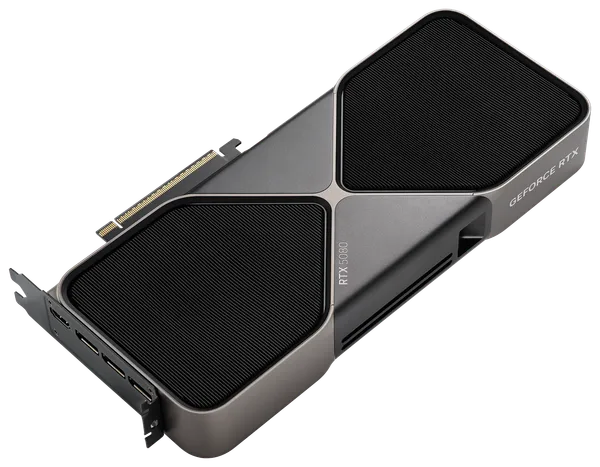
Q5orQ6, long contexts or video generation: the RTX 5090, with a quality power supply of at least 1,000W. - Before ordering a 5090, check three things: a native 12V-2x6 cable rated for 600W, a case that fits the card (the Founders Edition is 304mm long and partner cards vary), and airflow for roughly 500W of extra heat.
- Every GPU and PC we sell ships insured in an unbranded box, free on orders of $999 or more; details are on our shipping page.
Questions and answers
Is the RTX 5080 worth it over the RTX 5070 Ti?
Usually not. Tom's Hardware, Hardware Unboxed and Gamers Nexus all measured the 5080 about 9–16% faster with the same 16GB of VRAM, while it costs 46% more at our prices at the time of writing. It makes sense when the price gap is small, such as in a complete PC, or for 4K with heavy ray tracing or DLSS 5.
Is 16GB of VRAM enough in 2026?
For gaming at 1440p and 4K, yes; in Tom's Hardware's DLSS 5 testing at 1440p, only the 8GB cards got low-VRAM warnings. For local AI, 16GB holds models like gpt-oss-20b, but a 32B model at 4-bit needs about 20GB and only fits on the 32GB RTX 5090.
What power supply do I need for an RTX 5090?
NVIDIA lists 1,000W of required system power, based on a Ryzen 9 9950X system, and recommends a PCIe CEM 5.1 compliant unit. The card needs a 600W PCIe Gen 5 (12V-2x6) cable or four 8-pin cables through the included adapter.
Why is the RTX 5090 so expensive in 2026?
Memory shortages driven by AI data centers have raised GPU prices across the board, and AI buyers want the 5090's 32GB. Tom's Hardware's tracker listed $6,995 as the lowest US online price on 28 September, against a $1,999 launch MSRP.
Can the RTX 5070 Ti run local LLMs?
Yes, as long as the model fits in 16GB. OpenAI says gpt-oss-20b runs within 16GB, but Qwen3-32B at 4-bit is a 19.76GB file and Llama 3.3 70B at 4-bit is 42.52GB, so neither fits.
Sources
- GeForce RTX 5090 Graphics Cards (specifications)NVIDIA
- GeForce RTX 5080 Graphics Cards (specifications)NVIDIA
- GeForce RTX 5070 Family Graphics Cards (specifications)NVIDIA
- NVIDIA Blackwell GeForce RTX 50 Series Opens New World of AI Computer GraphicsNVIDIA Newsroom
- GPU price tracking 2026: lowest price on every graphics cardTom's Hardware
- Nvidia's RTX 5090 vanishes from online retail in the USTom's Hardware
- GPU Benchmarks Hierarchy 2026Tom's Hardware
- Nvidia GeForce RTX 5070 Ti ReviewTechSpot (Hardware Unboxed)
- Nvidia GeForce RTX 5090 ReviewTechSpot (Hardware Unboxed)
- Do Not Buy: NVIDIA RTX 5070 Ti GPU Absurdity (Benchmarks & Review)Gamers Nexus
- We go hands-on with Nvidia's DLSS 4.5 Dynamic Multi Frame Generation and its 5X and 6X multipliersTom's Hardware
- We tested DLSS 5 in NBA 2K27 with every RTX 50-series GPUTom's Hardware
- MSI teases new power supplies with 'instant protection' against melting RTX 5090 cablesTom's Hardware
- Qwen3-32B GGUF quantizationsHugging Face (bartowski)
- Llama-3.3-70B-Instruct GGUF quantizationsHugging Face (bartowski)
- gpt-oss-20b model cardOpenAI on Hugging Face
Prices, fees and specifications were checked on October 5, 2026 and change over time. Product prices are ours at the time of writing.