 More from ASUS6 in Monitors
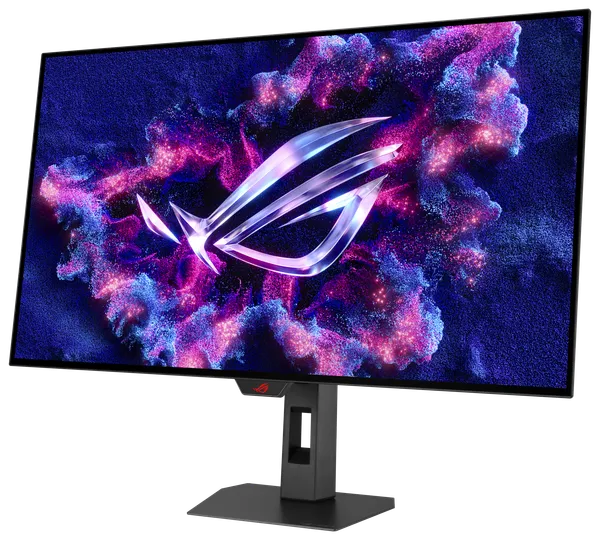
ASUS ROG Strix XG32UCWMG 32" 4K OLED 240Hz
Paid in Bitcoin, Monero, USDT or another coin you choose.
Insured shipping $29, free over $999. US delivery in about 5 to 11 business days. Shipping details
Overview
The ASUS ROG Strix XG32UCWMG is a 31.5-inch 4K WOLED monitor with two refresh modes: 3840 x 2160 at up to 240Hz, or 1920 x 1080 at up to 480Hz. It is meant for players with a high-end graphics card who want 4K sharpness at about 140 pixels per inch together with fast motion, a 0.03ms gray-to-gray rating and 1,500,000:1 contrast. It carries VESA DisplayHDR True Black 400 certification and ASUS quotes a 1,300-nit HDR peak.
Tom's Hardware measured about 450 nits for SDR in a 25% window and 1,300 nits in a 1% HDR window. Connectivity is broad: two HDMI 2.1 ports, DisplayPort 1.4 with DSC, a USB-C port with 15W power delivery, three USB 3.2 downstream ports and a KVM switch. A TrueBlack Glossy coating cuts reflections, and a Neo Proximity Sensor supports the burn-in protection tools.
The limits are practical. The 480Hz mode needs a one-time setup in the graphics control panel and cannot be switched during a game, and 1080p on a 31.5-inch panel is only about 68 pixels per inch, so it looks soft. There are no built-in speakers, and few current AAA games will reach 240 frames per second at 4K, even on the fastest cards.
Specifications
| Model | ASUS ROG Strix OLED XG32UCWMG |
|---|---|
| Panel type | WOLED, TrueBlack Glossy coating |
| Screen size | 31.5 in (32-inch class), 16:9 |
| Resolution | 3840 x 2160 (about 140 PPI) |
| Refresh rate | 240Hz at 4K |
| Dual mode | 1920 x 1080 at up to 480Hz |
| Response time | 0.03ms GtG |
| Brightness | 1300 nits HDR peak, about 450 nits SDR measured (25% window) |
| HDR | VESA DisplayHDR True Black 400 |
| Contrast ratio | 1,500,000:1 |
| Color gamut | 99% DCI-P3, 10-bit, Delta E under 2 |
| Adaptive sync | AMD FreeSync Premium Pro, G-SYNC Compatible |
| Video inputs | 1x DisplayPort 1.4 with DSC, 2x HDMI 2.1 (FRL) |
|---|---|
| USB-C | DisplayPort alt mode, 15W power delivery |
| USB hub and KVM | 3x USB 3.2 Gen 1 Type-A, built-in KVM switch |
| Audio | Earphone jack, no built-in speakers |
| Stand adjustment | Height 110mm, tilt +20 to -5, swivel +/-25 degrees |
|---|---|
| VESA mount | 100 x 100 mm |
| Dimensions with stand | 714 x 561 x 188 mm (W x H x D) |
| Weight | 6.6 kg with stand, 4.5 kg without |
| Warranty | 3 years, including panel burn-in |
Questions and answers
Still unsure? Visit the help center or message us.
Does the warranty cover burn-in?
Yes. ASUS lists a 3-year warranty that includes panel burn-in. Tom's Hardware also lists logo protection, pixel orbiter and pixel refresh, and the monitor has a Neo Proximity Sensor.
How do I switch to the 480Hz mode?
Tom's Hardware reports a one-time setup in the NVIDIA or AMD control panel, after which the switch takes two button clicks on the monitor. You cannot change modes while a game is running, and the 480Hz mode is 1920 x 1080.
Which inputs run 4K at 240Hz?
ASUS lists DisplayPort 1.4 with DSC and two HDMI 2.1 (FRL) ports. You need a GPU and cable that can carry that signal, and DSC for the DisplayPort input.
How is text clarity at 4K?
TweakTown says the updated RGWB subpixel layout no longer shows text fringing at about 140 PPI on these latest WOLED panels. The 1080p mode is much softer at 68 PPI.
What does the HDR look like?
ASUS rates a 1,300-nit peak. Tom's Hardware measured 1,300 nits in a 1% window but only about 735 nits in a 25% window, so large bright scenes are far dimmer than small highlights.
From the blog

Pairs well with
Picked to go with this product. Check sizes and connectors for your build before you order.