 More from ASUS11 in Graphics cards
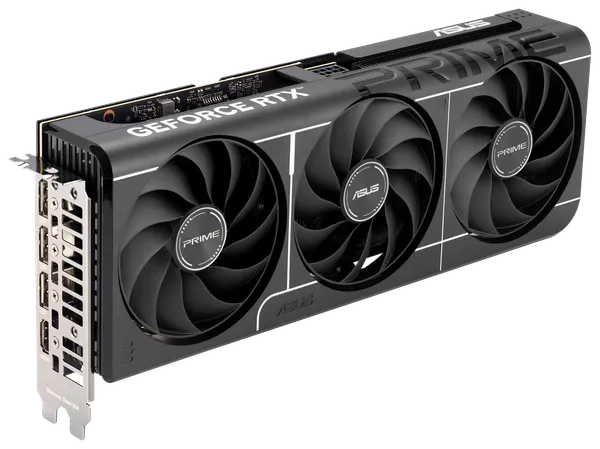
ASUS Prime GeForce RTX 5060 Ti OC 16GB
Paid in Bitcoin, Monero, USDT or another coin you choose.
Insured shipping $29, free over $999. US delivery in about 5 to 11 business days. Shipping details
Overview
The ASUS Prime GeForce RTX 5060 Ti OC 16GB is a triple-fan partner card built on NVIDIA's GeForce RTX 5060 Ti: Blackwell with 4,608 CUDA cores and 16GB of GDDR7 on a 128-bit bus, for up to 448 GB/s. ASUS runs it at 2,617 MHz boost out of the box and 2,647 MHz in OC mode, against NVIDIA's 2,570 MHz reference figure. It is aimed at 1080p at high refresh rates and 1440p gaming, with DLSS upscaling.
It measures 304 x 120 x 50 mm and is 2.5 slots thick, and ASUS describes it as SFF-Ready for compact builds. It needs just one 8-pin power connector, ASUS recommends a 550W power supply, and NVIDIA's reference total graphics power for the RTX 5060 Ti is 180W; ASUS does not publish a separate figure for this model. Cooling uses three Axial-tech fans that stop under light load, with dual BIOS (Performance and Quiet), GPU Guard and a vented backplate. Outputs are one HDMI 2.1b and three DisplayPort 2.1b, and ASUS lists no Aura Sync lighting for this model.
For local AI, 16GB holds 8B models at 8-bit and 12B to 14B models at 4-bit to 6-bit with a decent context window, though its 448 GB/s of bandwidth makes token generation slower than on the RTX 5070 Ti or RTX 5080. A 32B model at 4-bit needs around 20GB and will not fit entirely. CUDA support is broad, so PyTorch, llama.cpp, Ollama and most other AI tools run on it directly.
Specifications
| GPU | NVIDIA GeForce RTX 5060 Ti, Blackwell |
|---|---|
| CUDA cores | 4,608 |
| Boost clock | Up to 2,647 MHz in OC mode, 2,617 MHz default (NVIDIA reference: 2,570 MHz) |
| Memory | 16GB GDDR7, 128-bit, 28 Gbps |
| Memory bandwidth | Up to 448 GB/s |
| PCIe | PCIe 5.0 |
| Board power | 180W (NVIDIA reference; ASUS lists no figure for this model) |
|---|---|
| Recommended power supply | 550W (ASUS) |
| Power connectors | 1x 8-pin PCIe |
| Size | 304 x 120 x 50 mm, 2.5 slots, SFF-Ready |
| Display outputs | 1x HDMI 2.1b, 3x DisplayPort 2.1b (up to 4 displays) |
|---|---|
| Cooling | Three Axial-tech fans with dual-ball bearings, 0dB fan stop |
| Card features | Dual BIOS (Performance/Quiet), GPU Guard, vented backplate, stainless steel I/O bracket |
| Lighting | No Aura Sync lighting listed by ASUS |
| Software features | DLSS 4 with Multi Frame Generation, NVIDIA Reflex, ASUS GPU Tweak III |
| Model | ASUS PRIME-RTX5060TI-O16G |
Questions and answers
Still unsure? Visit the help center or message us.
What power supply does the Prime RTX 5060 Ti need?
ASUS recommends 550W for this model, based on a fully overclocked CPU and GPU; NVIDIA's figure for a reference RTX 5060 Ti is 600W, so a quality 550W to 600W unit with one 8-pin PCIe cable is a sensible target. It uses a standard 8-pin connector, not the 16-pin type, so no adapter is needed.
Will the Prime RTX 5060 Ti fit my case?
It is 304 mm long, 120 mm tall and 50 mm thick (2.5 slots), and ASUS describes it as SFF-Ready, so it suits many compact cases as well as standard towers. Check your case's graphics card length limit before ordering.
Is this the 16GB or the 8GB RTX 5060 Ti?
This is the 16GB model. The GPU, 4,608 CUDA cores, 128-bit bus and 448 GB/s of bandwidth are the same on both versions, but the 16GB card holds larger AI models and high-resolution textures without running out of memory. ASUS also raises the boost clock to 2,617 MHz by default and 2,647 MHz in OC mode, against NVIDIA's 2,570 MHz reference.
Which local AI models fit in 16GB of VRAM?
Roughly, 8B models at 8-bit and 12B to 14B models at 4-bit to 6-bit, with a decent context window. A 32B model at 4-bit needs around 20GB and will not fit entirely.
Can it run CUDA software?
Yes. It supports CUDA, so AI frameworks such as PyTorch, llama.cpp and Ollama, along with CUDA-accelerated rendering and video tools, run on it. NVIDIA's Studio Driver is available for creative applications alongside the Game Ready Driver.
Pairs well with
Picked to go with this product. Check sizes and connectors for your build before you order.