 More from ASUS11 in Graphics cards
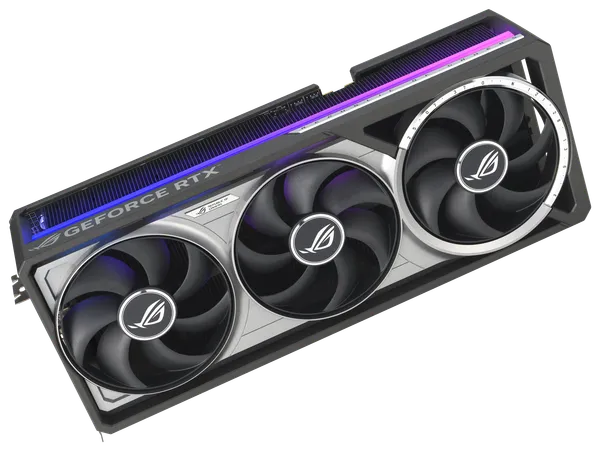
ASUS ROG Astral GeForce RTX 5080 OC 16GB
Paid in Bitcoin, Monero, USDT or another coin you choose.
Free insured shipping. US delivery in about 5 to 11 business days. Shipping details
Overview
The ASUS ROG Astral GeForce RTX 5080 OC is a quad-fan partner card built on NVIDIA's GeForce RTX 5080: Blackwell with 10,752 CUDA cores and 16GB of GDDR7 on a 256-bit bus, for up to 960 GB/s. ASUS runs it at 2,760 MHz boost out of the box and 2,790 MHz in OC mode, against NVIDIA's 2,620 MHz reference figure. It is aimed at 4K gaming with DLSS and at 1440p at high refresh rates.
It uses the same large body as the Astral RTX 5090: 357.6 x 149.3 x 76 mm and 3.8 slots thick, with one 16-pin power connector and an 850W power supply recommendation from ASUS. NVIDIA's reference total graphics power for the RTX 5080 is 360W; ASUS does not publish a separate figure for this model. Cooling uses four Axial-tech fans, a patented vapor chamber and a phase-change GPU thermal pad, and the card adds dual BIOS (Performance and Quiet), GPU Guard, a diecast frame and backplate, and Power Detector+ for the 16-pin cable. Outputs are two HDMI 2.1b and three DisplayPort 2.1b, and the ARGB lighting works with Aura Sync.
For local AI, 16GB holds 8B models at 8-bit and 12B to 14B models at 4-bit to 6-bit with a decent context window. A 32B model at 4-bit needs around 20GB and will not fit entirely. CUDA support is broad, so PyTorch, llama.cpp, Ollama and most other AI tools run on it directly.
Specifications
| GPU | NVIDIA GeForce RTX 5080, Blackwell |
|---|---|
| CUDA cores | 10,752 |
| Boost clock | Up to 2,790 MHz in OC mode, 2,760 MHz default (NVIDIA reference: 2,620 MHz) |
| Memory | 16GB GDDR7, 256-bit, 30 Gbps |
| Memory bandwidth | Up to 960 GB/s |
| PCIe | PCIe 5.0 |
| Board power | 360W (NVIDIA reference; ASUS lists no figure for this model) |
|---|---|
| Recommended power supply | 850W (ASUS) |
| Power connectors | 1x 16-pin (1-to-3 adapter cable included) |
| Size | 357.6 x 149.3 x 76 mm, 3.8 slots |
| Display outputs | 2x HDMI 2.1b, 3x DisplayPort 2.1b (up to 4 displays) |
|---|---|
| Cooling | Four Axial-tech fans, vapor chamber, phase-change GPU thermal pad |
| Card features | Dual BIOS (Performance/Quiet), Power Detector+, GPU Guard, diecast frame and backplate, FanConnect II |
| Lighting | ARGB, ASUS Aura Sync |
| Software features | DLSS 4 with Multi Frame Generation, NVIDIA Reflex, ASUS GPU Tweak III |
| Model | ASUS ROG-ASTRAL-RTX5080-O16G-GAMING |
Questions and answers
Still unsure? Visit the help center or message us.
What power supply does the ROG Astral RTX 5080 need?
ASUS recommends 850W for this model, the same figure NVIDIA gives for the RTX 5080, and ASUS bases it on a fully overclocked CPU and GPU. The card takes one 16-pin connector; use a native 16-pin cable from a PCIe 5.0 power supply or the included 1-to-3 adapter for 8-pin cables. Push the 16-pin plug in until it is fully seated with no visible gap, and avoid bending the cable sharply right at the connector.
Will the ROG Astral RTX 5080 fit my case?
It is 357.6 mm long, 149.3 mm tall and 76 mm thick (3.8 slots), the same size as the Astral RTX 5090. Check your case's graphics card length limit, the room above the card for the 16-pin cable and the space below the slot before ordering. ASUS includes a graphics card holder to support its weight.
How is the Astral different from the TUF Gaming RTX 5080?
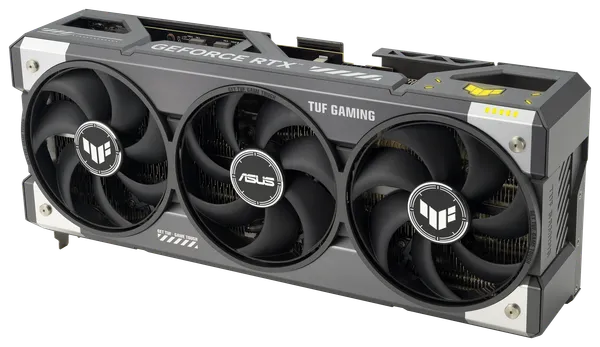
Both use the same RTX 5080 GPU with 16GB of GDDR7 and carry an 850W power supply recommendation. The Astral has four fans instead of three, is clocked higher (2,790 MHz in OC mode against 2,730 MHz on the TUF), and adds Power Detector+, a thermal map and FanConnect II fan headers. It is also bigger: 357.6 x 149.3 x 76 mm and 3.8 slots, against 348 x 146 x 72 mm and 3.6 slots for the TUF.
Which local AI models fit in 16GB of VRAM?
Roughly, 8B models at 8-bit and 12B to 14B models at 4-bit to 6-bit, with a decent context window. A 32B model at 4-bit needs around 20GB and will not fit entirely.
What does Power Detector+ do?
It watches each of the six power pins on the 16-pin cable for anomalies and notifies you if the cable needs to be reseated. It does not replace careful installation: push the 16-pin plug in until it is fully seated with no visible gap, and avoid bending the cable sharply right at the connector.
Pairs well with
Picked to go with this product. Check sizes and connectors for your build before you order.